New in v0.3.0: WindOp Pro with no API key, and memory you can see and edit

Organize. Run. Automate. Just ask.

WindOp is a free AI assistant for Windows and Mac. Type what you want done and it sorts folders, runs commands and drives your apps, with 340+ models to choose from. It asks before anything risky.

  • Rename screenshots by date
  • Set up a Python env
  • Back up my thesis folder
  • Summarise this PDF

Free· v0.3.0 · 10.1 MB· Windows 10/11 · macOS· 3,548+ downloads

No API key? Try WindOp Pro free for 14 days

WindOp desktop app after sorting a Downloads folder into Documents, Images, Audio and Installers and removing two duplicates

You ask · it does

Say it like you'd say it to a person.

WindOp works on your real files, terminal and apps. Here's what one sentence turned into on a real PC.

You

“Organize the files in Downloads by type and delete duplicate copies.”

  • Listed the 15 files in Downloads and checked their hashes
  • Explained its plan, and what it would keep, before touching anything
  • Sorted 13 files into 4 folders: Documents, Images, Audio, Installers
  • Removed 2 duplicate copies

Real run · 1 min 23 s · 15 files in, 13 sorted, 2 removed
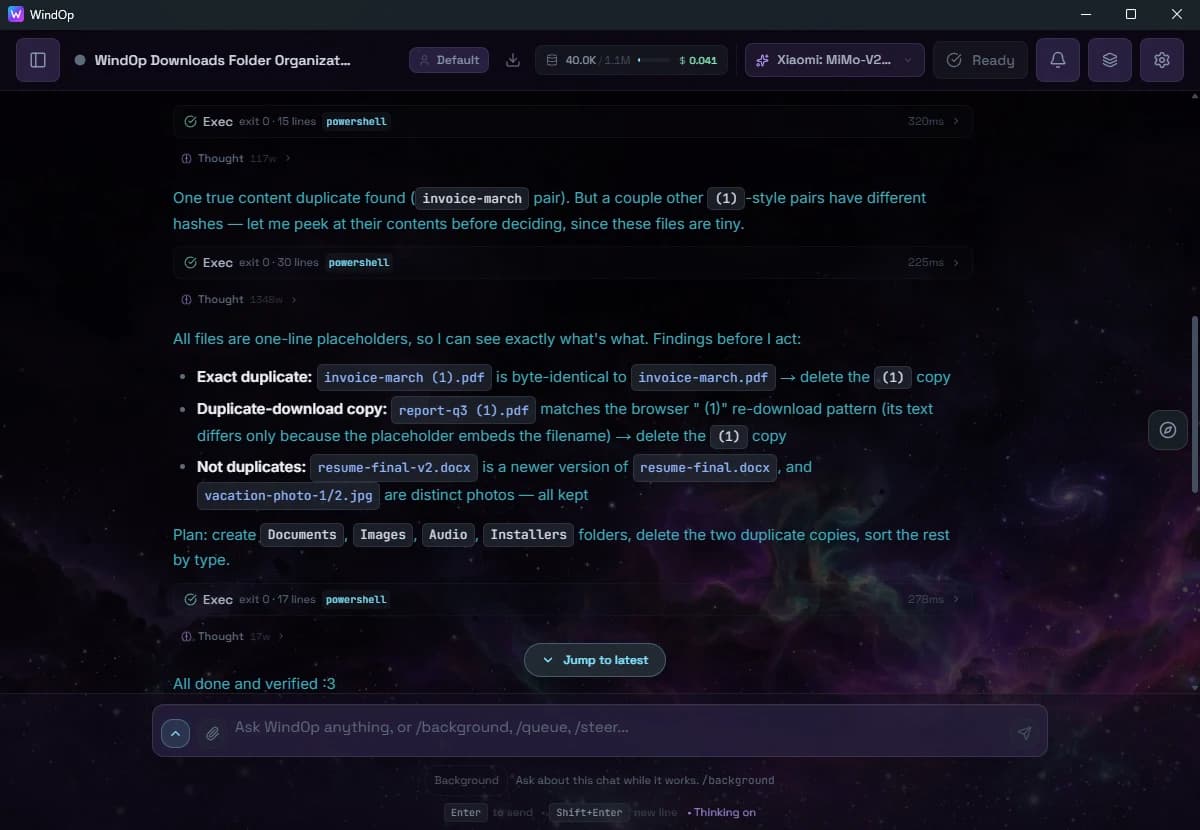
WindOp desktop app showing the agent's PowerShell steps and its reasoning while it checks for duplicate files

It shows its work.

Every command is listed, and it explains what it found before it changes anything.

Then a clear summary.

What moved where, what was deleted, and what it deliberately kept (a newer resume version, two different photos). Screenshots from the actual app, not a mock-up.


You

“Set up a Python environment for this repo and run the tests.”

  • Runs PowerShell, CMD or WSL commands and picks the right shell
  • Streams the output in real time
  • Asks before anything destructive

Example task

You

“Rename my screenshots by date and clean up the desktop.”

  • Renames files in bulk and finds duplicates
  • Creates a backup before edits and deletes
  • Can open apps, click buttons and navigate menus

Example task

Capabilities

More than a chatbot. Your PC operator.

WindOp doesn't just suggest. It actually does the work on your Windows PC. Just describe what you need.

01

340 AI Models

Access every major AI through OpenRouter. GPT-6.1 Terra Pro, Claude Haiku 5.5, Gemini 4 Argon, Grok 4.7, DeepSeek V4.1 Flash 1017 and more — switch models instantly with Ctrl+M. Your key, your choice.

02

Full Windows Control

WindOp sees your screen, moves your mouse, types on your keyboard. It can open apps, click buttons, and navigate menus — just like you would.

03

File Management

Organize folders, rename files in bulk, find duplicates, clean up your desktop. Smart find-and-replace across any file type.

04

Windows Shell Power

Run PowerShell, CMD, or WSL commands through conversation. Auto-detects the right shell. Streams output in real-time. Safe by default.

05

Multi-Agent Teams

Spawn specialist agents that collaborate. Code reviewer + security analyst + performance optimizer — all running in parallel on your machine.

06

Local-First by Design

Desktop actions run on your PC, where conversations and settings are primarily stored. Cloud AI requests send prompts and included context to your selected provider. The desktop app shares only anonymous usage analytics (random install ID, never your chats), and you can switch that off in Settings.

Every major lab

One app. Every model.

340+ models through OpenRouter, from the big labs to open-weight newcomers. Switch mid-chat with Ctrl+M. The newest model from each lab updates live.

  • OpenAI

    GPT

    All-rounders for chat, code, vision and tool use.

    NewestGPT-6.1 Terra Pro

  • Anthropic

    Claude

    Careful writing, long documents and coding.

    NewestClaude Haiku 5.5

  • Google

    Gemini

    Multimodal and fast, with very long context.

    NewestGemini 4 Argon

  • SpaceXAI

    Grok

    Quick, direct answers with a bold voice.

    NewestGrok 4.7

  • DeepSeek

    DeepSeek

    Open-weight reasoning at a low price.

    NewestDeepSeek V4.1 Flash 1017

  • Qwen

    Qwen

    Open models from Alibaba, strong across languages.

    NewestQwen3.8 Max Prime

  • Meta

    Meta

    Open and frontier models from Meta.

    NewestMuse Spark Open

  • Mistral

    Mistral

    Efficient European models, quick to answer.

    NewestMistral Large 4

  • 6+ more labs

    And the rest

    Z.ai, Tencent, MiniMax, NVIDIA, Xiaomi and every other model on OpenRouter.

How picking a model works

How it works

Up and running in 60 seconds.

The app is free. Connect AI however you like: WindOp credits, your own key, or an existing Claude/ChatGPT subscription. Pro is optional. Encrypted sync between devices is in preview.

  1. Step 1: Download & Install

    10.1 MB native installer. Runs on Windows 10/11 (64-bit) and on Macs with Apple Silicon or Intel. Built with Rust + Tauri v2 for speed and security.

  2. Step 2: Connect Your AI

    No API key needed: sign in and use WindOp credits, paste your own OpenRouter key (free models available), or use the Claude or ChatGPT plan you already pay for through Claude Code or Codex.

    Pro: Pro users: monthly WindOp credits are included, so there's nothing to set up.

Skip the setup with Pro

$20/month · 14-day free trial

  • Managed API keys — no OpenRouter setup
  • Cloud sync & backup — preview, opt-in
  • $10/mo AI credits included
View Plans

Comparison

They edit code. WindOp runs your PC.

See how WindOp compares to the alternatives. Built for Windows, not just code.

Different tools for different jobs — editors are great at editing code. Competitor details come from each vendor's public pricing and docs pages, checked September 30, 2026. Plans, models and features change often, so check their sites for current details. Windsurf was renamed Devin Desktop in June 2026.

FeatureWindOpCursor
Built ForWindows native (Tauri v2)VS Code-based editor
Main JobRun your whole PCWrite code
AI Models340 (OpenRouter)Vendor-curated list
Shell AccessFull (PowerShell, CMD, WSL)Terminal commands
Desktop Control
Multi-Agent
Free TierFree app (bring your own key)Free (limited agent use)
Paid PlanPro (optional)Pro $20/mo
FeatureWindOpWindsurf (Devin Desktop)
Built ForWindows native (Tauri v2)Desktop editor + agents
Main JobRun your whole PCWrite code
AI Models340 (OpenRouter)Vendor-curated list
Shell AccessFull (PowerShell, CMD, WSL)Terminal commands
Desktop Control
Multi-Agent
Free TierFree app (bring your own key)Free (light quota)
Paid PlanPro (optional)Pro $20/mo
FeatureWindOpGitHub Copilot
Built ForWindows native (Tauri v2)Editor extension, CLI, GitHub
Main JobRun your whole PCWrite code
AI Models340 (OpenRouter)Vendor-curated list
Shell AccessFull (PowerShell, CMD, WSL)Terminal commands
Desktop Control
Multi-Agent
Free TierFree app (bring your own key)Free (2,000 completions/mo)
Paid PlanPro (optional)Pro $10/mo

From the community

Heard in our Discord.

Unprompted posts from WindOp users in the #testimonials channel, quoted as written.

WindOp has been an incredible tool in my journey through the cyber world. It's helped me build projects that truly test and sharpen my skills, all while giving me the freedom to personalize my own website exactly the way I need it. … I'm grateful for what WindOp has empowered me to create, and I'm excited for the many more opportunities ahead. Here's to the future — thank you, WindOp!

Michael DDiscord: Mikesurguy · · from the WindOp Discord

File organization success story

movie files
101
moved
39.96 GB
not hours
Minutes

WindOp gathered 101 movie files scattered across subfolders of Downloads\Telegram Desktop into one folder: it scanned subdirectories recursively, detected video types (mp4, mkv, avi, mov, wmv, flv, webm), created the folders, moved everything in bulk with duplicate handling, reported progress and finished with a verification.

“What would have taken hours of manual work was completed in minutes!”

ElbrothDiscord: htorble · · from the WindOp Discord

Done something great with WindOp?

Share your story in #testimonials on our Discord.

  • Windows Native
  • Tauri v2
  • Rust
  • TypeScript
  • OpenRouter
  • 340+ Models
  • PowerShell
  • CMD
  • WSL

Join 3,548+ downloads and counting. Download free

FAQ

Questions, answered.

More in the docs or on Pricing.

Is WindOp really free?

The app is free to download and use. On the free plan you bring your own OpenRouter API key, so you pay OpenRouter (or use its free models) for AI usage. Pro is optional and adds managed AI access so you don't need your own key.

Is it safe to let an AI control my PC?

Risky actions such as deleting files or running destructive commands ask for your approval first, edits and deletes create backups, and saved permissions are scoped to an exact command and folder. You can tune this in Settings > Security.

What data leaves my computer?

Desktop actions run locally, and chats and settings are stored on your machine. The prompts, files, and screenshots you include in a request go to the AI provider you choose. The app can also share anonymous usage analytics tied to a random install ID, which you can switch off in Settings.

Which AI models can I use?

340+ models through OpenRouter, from labs such as OpenAI, Anthropic, Google and the open-source community. You can switch models at any time.

Does it work on Mac?

Yes. WindOp runs on Windows 10 and 11 (64-bit) and on macOS, with separate downloads for Apple Silicon and Intel Macs. The Mac app isn't notarized by Apple yet, so the first time you open it you'll need to click Open Anyway in System Settings → Privacy & Security.

Do I need an account?

No account is needed to download, install, and use the free app with your own key. An account is only needed for Pro features like managed AI access.

Free for Windows and Mac

Put it to work.

Get started in a few minutes. The app is free, and no account is needed to use it with your own API key.

  1. Download10.1 MB installer for Windows or Mac
  2. Connect an AIWindOp credits, your own key, or your Claude/ChatGPT plan
  3. Start commandingTell WindOp what to do — it does it

v0.3.0 · Windows 10/11 · macOS · Free app· 3,548+ downloads